
When choosing an LCD screen for business or commercial use, it is important that the screen should be designed for the purpose, and suitable for the environment it will be used in. Industrial LCD’s are a good choice – whereas cheap consumer LCD’s might be attractive because of the price and easy availability, but they can fail quickly when used for long hours and exposed to harsher conditions than what they’re designed for.
If the screen is for indoor use, it will not need as much protection as an outdoor screen. However even indoors, the usage in a commercial situation will be far higher than a typical consumer screen is designed for. And if it is going into a moving vehicle or boat, there will be other special needs to consider.
Screen protection
If you plan to use consumer grade screens outdoors, whether protected or not, it’s likely that damage will be sustained due to the temperature changes, constant exposure to the elements, and long hours of use – and this kind of use will void the warranty.
Therefore, for outdoor use you should buy commercial grade or industrial grade LCD screens that are designed to be used outdoors. Generally there are 2 ways of achieving weather protection:
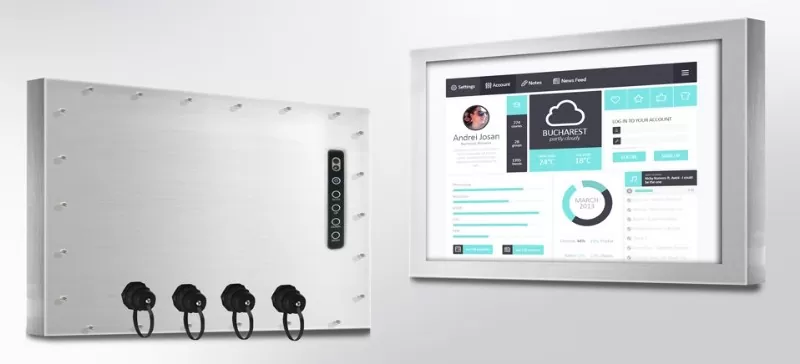
- The monitor itself can be fully sealed, rated to IP66, and made from a resilient material such as stainless steel with glass over the screen. This kind of monitor is generally known as an “Industrial LCD monitor”, although there are industrial models designed for both indoors and outdoors, with varying IP and temperature ratings and varying brightnesses.
- A standard (indoor) commercial display can be purchased and installed into an outdoor enclosure. However when doing this you need to make sure that the enclosure is designed for the task, and has sufficient cooling to keep the monitor within its temperature specification. In addition you need to carefully check the commercial display’s ratings, as being in an outdoor enclosure could still exceed the rated temperature range of the screen.
Consumer or commercial grade screens?
Commercial displays carry a higher price tag, but then they are designed for continual outdoor use for 16 hours per day or more, and tend to be much higher quality than consumer screens. By comparison, consumer screens carry three fundamental flaws when used for commercial situations:
1. The bezel
The surround on consumer screens is typically thicker at the bottom than the other three sides. If you plan to install digital signage screens in portrait orientation, they will look uneven like this. Commercial grade screens have a thinner, more even bezel, which makes them better suited for use in portrait orientation.
2. Quality of manufacturing
Commercial screens are manufactured to last longer. They can remain switched on for lengthy periods, whereas consumer screens are not designed for the same sort of use. However, if you need to cut costs, consumer screens may still do the job. Just be aware that they may not last as long, and can be affected by exposure to direct sunlight, which could cost you more in the long-term.
3. Functionality
Compared to commercial grade screens, consumer displays don’t have some of the features needed to support unattended use, digital signage, etc. Whether consumer or commercial, always check the screen has the features you need.
4. Temperature tolerance
Consumer screens tend to be designed for indoor home use, where the temperature will always be reasonably comfortable. Commercial and industrial LCD’s on the other hand, can be used in places where the temperature is not well regulated, for example mounted up high on a wall exposed to the sun, or mounted in an outdoor enclosure etc. If you put a consumer LCD into a high temperature environment, the screen can get damaged.
Using screens outdoors
When using digital signage screens outdoors, here are a few things to consider:
Daylight vs Night
Standard (consumer) screens are not bright enough to be viewed in sunlight. As a result, commercial and industrial LCD’s are available with high brightness. These daylight or sunlight readable displays, maintain screen visibility in extreme sunlight by making use of a few technical features. The most obvious way to achieve this is to emit a high level of light, often described as luminance, which is the amount of light radiated from the screen. Luminance is measured in candelas per square metre, a measurement more commonly referred to as “nits”. For a screen to be visible in direct sunlight, you need a high-brightness screen with a luminance rating of at least 1,000 nits. The other main feature to look out for is an anti-reflective coating on the display. Often when viewing LCD’s outdoors, the readability is impaired by reflections of the sky and bright objects around. Hence by reducing or eliminating these bright reflections, the readability is improved. Combining high brightness and anti-reflective coatings gives the best daylight readability for a monitor.
However you also need to consider how a high brightness monitor will appear when viewed at night. If it’s set to super high brightness, it will be dazzlingly bright at night time. Hence it is ideal to use a monitor that has automatic brightness adjustment via a light sensor, so it automatically dims when the ambient light level is low.
Weatherproofing
Rain, snow, condensation and temperature extremes are major damage threats to industrial LCDs and digital signage screens used outdoors. Rain can drive at the monitor from any angle, and work its way inside to the electronics. Snow can build up and melt into the smallest crevices. Condensation can form inside the monitor if the temperature drops quickly, and this moisture, being inside the monitor, can cause immediate damage to the electronics. The temperature can soar to over 60 degrees when a monitor is mounted outdoors in direct sunlight, or drop to well below freezing overnight.
Weather protection can be achieved either by using an industrial monitor that is fully sealed to IP66 and rated for outdoor use, or by using an outdoor digital signage enclosure with a suitably rated commercial monitor. Fully sealed industrial LCD’s are a great all in one solution, as they are designed from the ground up to handle the rigours of outdoor use. On the other hand enclosures can be more flexible, with the potential to upgrade screens independently of other hardware as technology advances. However care must be taken to use a suitable commercial LCD monitor inside the enclosure, as most enclosures cannot fully protect the monitor against temperature extremes or direct sunlight.
Vandalism
Another factor to consider outdoors is protection from vandalism and theft. If the monitor is to be installed in a publicly accessible place, it should be made as secure and vandal proof as possible. Stainless steel outdoor rated industrial LCD’s are a good choice for this, especially when fitted with 6mm thick glass. When using an enclosure, it should also be checked for anti-vandalism design features. You might also want the monitor controls to be inaccessible to the public, to avoid people tampering with the monitor setup.
LCD’s on moving vehicles
If your LCD monitor is to be installed on a moving vehicle or boat, there are even more things to consider. The monitor will be subject to continual shock and vibration, so it should be ruggedised to cope with this. The temperature can be very extreme when monitors are mounted inside a parked vehicle in the sun. And it needs to be very easy to dim the display right down to almost black, when using the monitor at night, especially in a marine environment. This kind of dimming is best achieved with a rotary knob on the front of the monitor, so operators can easily adjust the screen to make it easy on their eyes.
Esis recommends CyberVisuell industrial LCD monitors, as they cover a very wide range of sizes and types, including IP66 outdoor rated, marine grade, indoor industrial monitors, and touch screens. To find out a suitable model for your needs, please contact us.


