
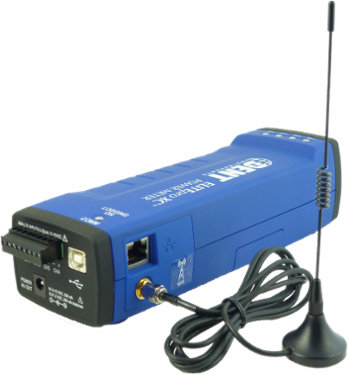
The popular and versatile ELITEPro-XC 3-phase energy data logger is loaded with features to make data logging jobs easy. One of the most useful upgrades in recent times, is the DENT Instruments mobile app. With this app and a Wi-Fi enabled ElitePro-XC logger, you can conveniently set up the logger from your phone, as well as monitoring the data in real time on site. In addition, you can use the app to view the THD (total harmonic distortion) with a graphical break-down of harmonics. This is ideal for troubleshooting power issues on site.
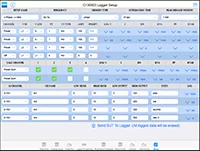
SETUP THE ELITEPRO XC FROM THE APP
No PC at the job site? No problem. Configure the Wi-Fi-enabled ELITEpro XC meter directly from the Mobile App on your tablet. Make changes to integration type, peak demand window, & channel configuration, including analog channels. Once you’re done, send the Setup Table to the logger. Feature available for tablets only.
TOTAL HARMONIC DISTORTION (THD)
If your readings in ELOG seem off, it may be due to harmonic distortion. There is now an easy way to see Total Harmonic Distortion using the ELITEpro Mobile App on your tablet and your ELITEpro XC. Harmonics can be seen as a percentage of the fundamental or as RMS for each channel.

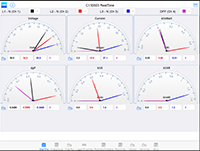
PHASOR PLOT & REAL-TIME VALUES
Returning to a job site to correct a meter setup issue costs time and money. Use the Phasor Plot diagram in the ELITEpro Mobile App on your phone or tablet to make sure CTs are in the right phase. See the larger image here.
In addition, view voltage, current, kW, dpF, kVA, and kVAR in real-time on your tablet. Values are presented visually as gauges and numerical values. Colours can be customized for all channels to comply with regional electrical codes.
ELOG 15 & CURRENT FIRMWARE REQUIRED
ELOG 15 is required to use the Mobile App. Here is an overview of the features:
- Visual CT Chooser: Take the guesswork out of the meter setup. Select the CT you wish to use and Amp and Phase Shift settings are input into the Setup Table.
- Total Harmonic Distortion (THD) Tracking: Easily track Total Harmonic Distortion using ELOG and your ELITEpro XC. See THD in Realtime Values and Data File Summary screens. THD percentage shows up in a new column in both areas.
- Load & Save Wi-Fi Settings: Speed up meter configuration by saving Wi-Fi Settings in ELOG. Use saved settings when configuring multiple loggers to save even more time.
- Firmware Update: Bundled with new ELOG 15 is updated ELITEpro XC firmware. The new firmware provides minor enhancements and fixes to the meter which allow it to work at peak performance. Once ELOG 15 is installed, you’ll be asked to update the logger firmware and be guided through the process.
- Compatibility: Windows 10, Windows 8, & Windows 7
The use of the Mobile App requires ELOG 15 software, the latest ELITEpro firmware, and a Wi-Fi-enabled ELITEpro XC meter. Users can upgrade their software to the latest version by opening ELOG, clicking Help > Check for Updates or visiting the Download page on the DENT website.
ESIS specializes in Electrical Data Loggers and is the leading supplier of industrial electronic equipment in the Australian market since 1971. Choose from our wide range of products to best suit your requirements.
Contact us right away to discuss your needs.
Article Courtesy of DENT.


